This was my first year using AI coding tools. I’m often asked what I use AI coding for outside of work. Here I document what I’ve built with AI.
When I say “AI coding”, I’m excluding asking a chatbot for code and copy/pasting it into a file. I’m referring to tools that will write the code directly to the file.
I’ll exclude my use cases from work with a few exceptions. Once you start using AI for actual professional work, the lines between AI output and your output become blurry.
Table of Contents
- Making it Easy to Search 500+ Video Clips
- Scraping my Payslips
- Downloading my IMDB Vote History
- Scraping the IMDB Top 250
- Proxy that Automatically Refreshes Tokens
- Quickly Getting Tracebacks from Github Actions Emails
- Quickly Creating Jira Stories
- Simulating Telephone Conversations Between Nurses and Difficult Patients
- Extracting financials of all S&P 500 companies
- Extracting Email Addresses for Everyone I’ve Ever Emailed at Work
- Elisp Functions for my Revamped TODO System
- Review my Comments for Flaws Before Posting on Hacker News
- Converting Hyphens to Em-Dashes in My Blog
- Splitting up an Audio Book’s MP3 Files into Individual Chapters to Play on a Yoto
- Conclusion(s)
Daily Show Clips Transcripts
This was my first AI coding project, way back in February.
Everyone remembers their first time.
I watched virtually every episode of The Daily Show from 2003 through almost the end of Jon Stewart’s first tenure. I was in the habit of keeping clips that I found funny. I have over 500 clips.

Although I tried to give them meaningful names, it was always hard to search for a particular clip. It occurred to me that if I could extract the transcript of each clip, I could put them in some vector database to ease searching.
This idea had been on my mind for a few years, but I never bothered to code it. Conceptually, it’s straightforward. But it consists of a number of boring parts:
- Extracting the audio of each file
- Using Whisper to transcribe the audio file
- Bookkeeping: being able to associate a particular transcript to a particular video file
- Generally dealing with traversing directories, etc in Python
I had heard of Aider mentioned multiple times on Hacker News, so I thought I’d give it a try. It was past 10:00 PM one night and my goal was merely to install the tool and get a basic idea of its usage before turning in for the night and tackling the problem the next day.
15 minutes later, I had downloaded the tool and had a fully functioning script.
This was mind-blowing.
And I was hooked.
Although the script did everything I needed, I wanted to see how much further I could take it. I always liked my tools to have a command line interface, whereas currently all the inputs were hardcoded in the script. So I asked Aider to create command line arguments, and it did it without fail.
It’s never fun to use argparse. It was so nice to have an AI take care of all the details.
Next I decided to add logging. I logged the length of each video file as well as the time it took to process each video file: extracting the audio as well as the time to transcribe it. I had it keep the running total and provide a report at the very end.
I had only to give a description of all this and it appropriately took care of the math.
Setting up nicely formatted logging is never fun. It was so nice to have the AI take care of it. The best part was that I didn’t have to tell it how to make the output look nice. It just did it by default.
Whisper used up all my cores when processing a video. Occasionally I have had problems where on some audio files Whisper goes insane and consumes all my RAM. To control this, I wanted to limit the number of threads that it could use at a time. This was the most difficult task for the AI to solve and it spent the most amount of time/tokens on it. It tried several approaches and I would keep reporting back that it didn’t work. Finally, it went a completely different route and managed to solve the problem. As a result of that, I learned about a whole new Python library.
The code was fairly decent. It made a few bugs. Most of the time I’d merely report the bug and it would fix it, but once or twice I had to dive into the code and take care of it myself.
The whole session took a little over an hour. At the end I had a production-grade script.
For a script I would run only once in my life!
This marked a turning point in my script writing life. Even for throw-away scripts, I now aim to have fairly decent logging and command line arguments. It’s almost free. Why not?
Speaking of the cost, this cost me about $1.40. In fact, it should have only cost me about half of that-I simply wasn’t aware of the /clear command to clear the context. Remember, I had just learned the bare minimum on how to use Aider.
The model, BTW, was gpt-4o.
The next day I went to work and told my coworker that “personal coding” for me would never be the same again.
Scraping My Payslips
I store almost all of my financial transactions in a finance software. That includes the details of all my paychecks, what the gross pay was, how much I paid in federal taxes, and so on. I entered all the data manually. As you can imagine, this is a royal pain.
For years, I dreamed of writing a script that would go to my pay portal at work and download all the information for easier consumption.
This seemed like a good next project for an AI.
My payslips were in a Workday portal. I had the script use Playwright to navigate to the site, log in, click on each payslip, scrape the data and convert to JSON.
Given that the AI is doing most of the work, why not throw in some nice features such as specifying the span of dates for which to extract the payslips?
Since I was going to email all this information to myself, I didn’t want to send it in plain text. I had the script optionally encrypt the output. Once again, the AI gave me lots of nice warm fuzzy feelings because even though I asked it only to encrypt it, it went ahead and said, “Hey, since you’re encrypting this, you’ll probably need another script to decrypt it,” and it went ahead and wrote the decryption script. Not only that, when you run the script, at the very end it helpfully tells you the exact command you need to run to decrypt.
Coding this up took a lot longer than the first project and cost me about $3.50. Most of it, though, was due to my lack of front-end expertise. I tried different JS/CSS selectors to get the data, and none proved robust until I finally found a strategy that would work (“Just output all the tables to the JSON”). My guess is a front-end expert would have honed in on the solution immediately.
But hey, for a few hours’ work and $3.50, I have all the payslips since I started working at the company!
In the middle of the year, I changed jobs and wrote a similar script at the new company. It was much easier to scrape the information from my new company’s portal.
IMDB Voting History
For over 20 years, I’ve rated (on IMDB) every movie I’ve watched. I’ve lived in perpetual fear that one day Amazon will decide to block off my access to that data and I’ll lose my multiple decades worth of my voting history.

This is another script I’ve been thinking of writing for years.
I got the AI to use Playwright to log into my account and scrape all the voting history, including metadata such as date voted, director, year the movie came out, actual poster file, etc.
This was very quick to write.
One day I’ll extend this to do some analytics such as my rating trends versus the decade the movie was made in, etc.
IMDB Top 250
At one point, I had watched 242 of the Top 250 movies on IMDB.
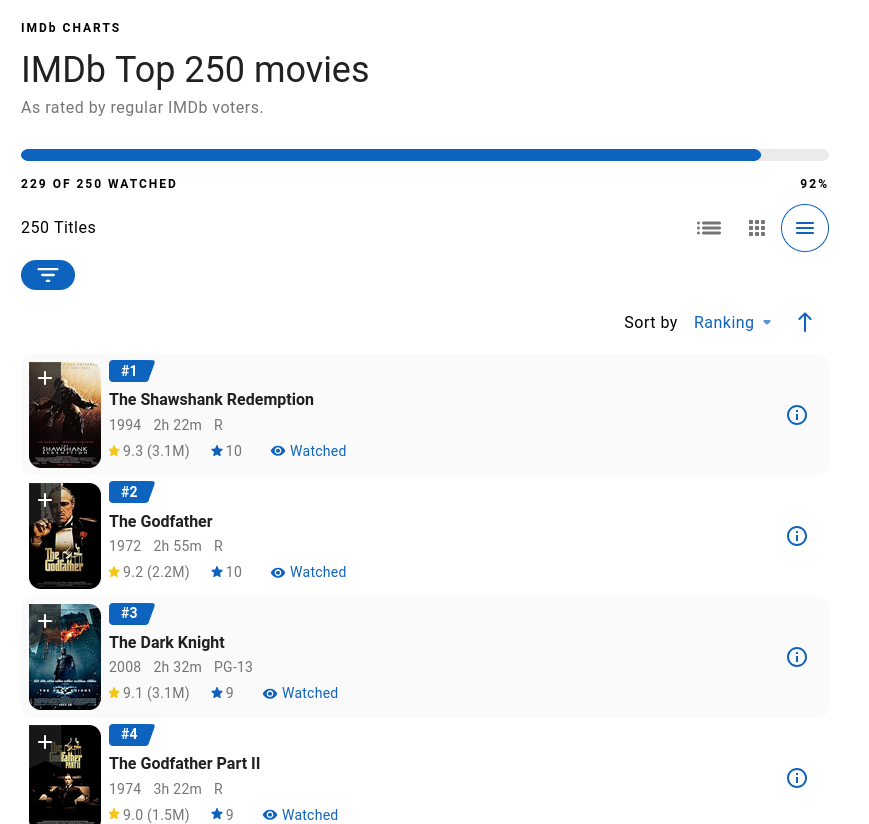
As you can see, the number has dropped (the list is dynamic). Every once in a while I want to randomly pick an unwatched movie from the list. So I wrote a script to scrape it and pick one unrated movie at random.
I see they’ve now added the feature to show me which ones I’ve not rated. Still, it’s nice to have a tool that just spits out a name of a movie.
Proxy Server To Rotate Tokens
At work, they gave us access to corporate-approved OpenAI compatible APIs so that we could use whichever AI tool we thought was appropriate for our work. The problem with the API they gave us is the token would expire every 30 minutes. Not a lot of tools are equipped to handle that and the tool would have to be restarted.
I had the AI write a proxy server in Django that would request a new token every time it expired. All the tools would point to my proxy server: the server would simply forward the requests.
I’m sure this is a problem that had been solved a thousand times over. I did do a fairly minimal search to see if I could find an off-the-shelf solution, but gosh, it was trivial to simply have the AI write it for me. I feel I should have been able to write it myself, and this gives you a sense of the downside of using AI for coding: You don’t have to struggle to write these things and thus you don’t learn as much.
MCP for Github CI
At work we had a CI system using GitHub. Every time there was a failure, I’d get an email. To see the actual details of the failure, I would click the link in the email and then I would have to click multiple times in the browser to finally get to the traceback I was looking for.
I was tired of all the clicking.
Although GitHub MCPs existed, I never want to trust a third-party MCP in the hands of an AI. It takes more work to scrutinize the capabilities of a third-party MCP and audit for security than it is to simply write a minimal MCP that does exactly what I need.
All I needed was to access the artifacts/logs of a given run, given the run ID.
I don’t remember how much of it I researched on my own, but I’m fairly sure that I didn’t have to give the AI the actual API endpoints. I described what I needed and it already knew the appropriate APIs to call.
It wrote the code fairly quickly and, using my chatbot, all I had to do was give it the ID of a failed run and it would go fetch all the logs and print out the actual traceback.
I wish I had taken it further and added VBA to my Outlook so I could fetch it straight from within Outlook.
MCP for Jira
As the architect of the project we were working on, dealing with JIRA was an unfortunate fact of life.
I grew tired of creating JIRA stories at the beginning of every sprint.
This sounded like a good task for an AI via MCP. Once again, although third-party MCPs existed, I wrote my own MCP server for JIRA.
All I needed was to allow the AI to create a story given some basic information.
Once again, it was trivial to write. At the end of the project, all I had to do was tell the chatbot the list of titles and it would go ahead and create one story for each title.
My co-worker was surprised I gave it access to our JIRA board. “What if AI decided to create a thousand stories instead of just the ones you told it to?”
I shrugged.
Extract Email Addresses of All the People I Ever Sent An Email To (at Work)
It is common for people leaving the company to send out a farewell email. I always wondered how they decided who to send the emails to. I would often get farewell emails from people I hadn’t interacted with in years and only had a marginal relationship with.
When it came time for me to leave, I decided to get all the email addresses I had ever sent an email to. Then I would go through each one and filter out all the non-humans. We used Outlook at work and I had saved all the sent emails. I had the AI write a VBA script to go through all the emails in my sent folder and make a list of the unique email addresses.
Next, I had to remove all addresses of people who had already left the company. Fortunately, Microsoft Exchange makes it easy to figure that out.
Finally, I needed to associate a person to each email address. This was not a straightforward task and I’m so glad that the AI was finally able to figure out how to do it.
Quarterly Financial Statements of Public Companies
I had the AI write a script to extract the last quarterly financial statement of all the companies in the S&P 500 and perform some basic analyses on it.
Nurse Calls
A nurse I know has to deal with difficult patients on the phone. Call durations are noted and they need to meet a target for the number of calls every day.
Difficult patients means longer calls. Which means not meeting the quota for the day.
She wanted practice dealing with difficult patients. I wondered if an AI would be up to the task. Not long before, Google had released their Gemini Live API that supposedly did a decent job of simulating real-time human communications.
The idea I had was to give it a system prompt to act like a very difficult and abusive patient. I wanted the conversation to occur, and then send the transcript to a more powerful LLM for analysis and feedback on how well the nurse did in that call.
Incidentally, the first part can be done without any coding at all. Just log in to the Google portal and give it the system prompt and you’re good to go. However, I wanted to hook it up to the analysis portion and didn’t want to rely on the Google portal always being available.
This was the most challenging project I’ve had so far with AI coding. It took me 3-4 attempts before I finally got something working. A lot of the thrash was due to my experimenting with different approaches I’d seen others use on AI coding.
My first attempt was to have a Q&A with an LLM to hash out the requirements. It would then print a detailed requirements/architecture document and that would be fed to an even more powerful LLM to come up with step-by-step prompts to give to the AI. You would then simply copy/paste each prompt and by the end you would have a working program. This first attempt failed miserably. It hallucinated a fair number of details such as how to connect to the Google Live API. When that failed, it became clear that many of the subsequent steps would not work because they made certain assumptions that weren’t true.
I abandoned it and started over.
And then abandoned that and started over again.
Finally, I decided to code it the way I would have approached it: First write proof of concepts for all the unknowns to get a feel of how every little bit works, and then rewrite it, gluing all the pieces together.
I had the AI write a proof of concept for connecting to the Live API. It wrote another one to ensure I could reliably use my headset and get the audio from the microphone. This culminated in my being able to have a full-blown voice conversation with the LLM.
I wrote another proof of concept to ensure that I can record the conversation as an audio file as well as get the transcript — not through using Whisper but having the Live API actually send me the transcript as a conversation proceeded.
I hit a number of snags in these proof of concepts, which required me to debug issues on my system. This showed the utility of doing experiments before diving in.
All this didn’t take much time. I then made a big mistake: Instead of simply modifying my experiments and expanding it to become the full-blown script, I told the LLM to summarize everything we had done. I gave it my requirements and told it to write a requirements doc as well as all the prompts. I then proceeded to give it each prompt one by one.
It just kept making silly mistakes. It would claim to have made edits to a file when it didn’t. It often would simply print out the code and ask me to make the edits. I ran into so many such problems. All in all, this session cost me over $20. In retrospect, had I just had it edit the existing proof of concepts, it would have worked pretty quickly.
The other big mistake I made was insisting on having it write tests. I didn’t have time to scrutinize all the tests it was writing. And often when it would make a change and break existing tests, it wasn’t clear to me whether the test was at fault or the code. Eventually, though, it sorted it all out and I finally had a fully working script.
The final mistake I made was using GPT 5.1 when there was a dedicated Codex model that I probably should have been using. I suspect all my issues with it not making appropriate edits was due to the model not being tuned for agent work.
Combined with all the prior attempts, I’m sure it cost me over $30 to make this script.
So how useful was the script for the actual task it was meant to do? The nurse tried it once. While I personally found the AI role to be a bit contrived, she said that it actually did a pretty good simulation of how patients talk and how unreasonable they can be. However, the nurse never had time to actually use the tool to get feedback after the initial run.
There are some changes I want to make. To begin with, I’ve instructed the AI to be unreasonable. No matter how you try to placate it, it will still be unreasonable. And while this is true of a number of patients, it may be more useful to simulate having patients that are very upset, but that can be calmed down if you use appropriate communication techniques. I haven’t tried it, but I suspect this will be a lot harder to get an LLM to do.
Elisp for Task Management
I’m in the middle of revamping how I manage my daily TODOs. I’ve always managed them in Org Mode and Emacs. I came up with a new framework and was trying to figure out how to mold that into something I can do with Org Mode. I had the AI write a lot of utility functions for this purpose.
Sadly, this means my Elisp skills may never mature.
HN Comment Feedback
The idea: Before I leave a comment in a forum like Hacker News or Reddit, wouldn’t it be nice to have an LLM look over the whole context of the discussion to find potential problems in the comment I’m about to post?
Examples of problems:
- I don’t realize the person I’m responding to is different from a person earlier in the thread, and I mistakenly say “Well, earlier you said …”
- I’m in violent agreement with someone (i.e. mistakenly thinking the person is taking the opposite stance from me).
- I’m not realizing there is other context somewhere in the thread that addresses my concern.
The list goes on. I tend to be particular in these things and it’s embarrassing whenever it happens.
So how about a button next to the submission button that will send the data to the LLM and somehow I’ll get feedback?
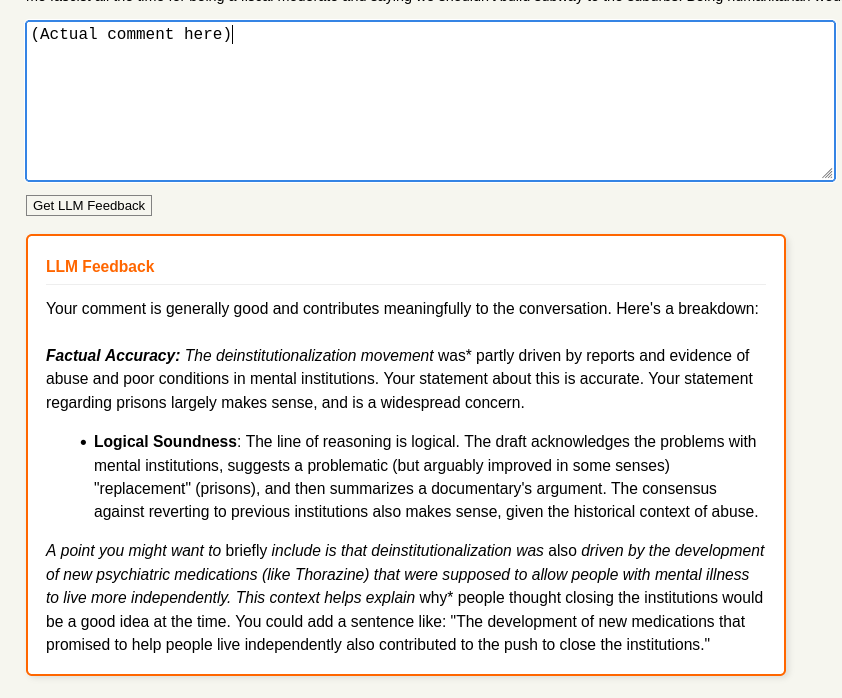
The AI coded this up really quickly for me. It uses TamperMonkey (I thought it would go for Greasemonkey, but I’m old). It sends my comment, and all its parents to the root to the LLM.
This is my first project after the fantastic Z.ai discount where I signed up for a full year’s worth of coding for under $30. I’m very satisfied with that purchase. I coded this using opencode.
One thing to note: I didn’t pick the styling. It automatically picked colors appropriate for Hacker News.
The challenging portion of this is not the actual coding part, but figuring out an appropriate prompt to give to the LLM. Initially, it was giving me a much too detailed feedback. I finally, after several iterations, managed to get it to pare down the feedback to something fairly simple. However, I feel I may have simplified it too much and it may, in an attempt not to be too fussy, be letting things slide through. I’ll have to keep experimenting.
At the moment, it is marginally useful. It mostly tells me my comment is fine, but occasionally gives me additional context from its knowledge that could be useful to add (or it could just be hallucinated).
Even if the feedback is not that useful, it’s so cheap for me to send the information, since the button is always there. I click on it every time I’m about to leave the comment. Why not?
Further enhancements I’d like to make:
- Sending not just all the parents, but the whole thread. There may be useful information in sibling threads that address what I am writing about.
- Send the text of the submission as well so that the LLM may be able to flag instances where I’m writing something that is directly refuted in the article.
Em-Dash Blog
I wrote a plugin that converts all hyphens to em-dashes on my Pelican blog. I simply gave it the URL of the documentation on how to write plugins and it did the rest.
My flow when I write blog posts: I author them in org format and have a plugin convert it to reStructuredText. Then Pelican converts it to HTML. It pondered where to inject the em-dashes and we had a back-and-forth discussion before it decided that the best place to inject them was actually at the HTML level.
The nice thing is that it automatically handles hyphens within code blocks — meaning it doesn’t convert them into em-dashes. I also told it not to convert em-dashes within the LaTeX content as that could just mean subtraction in a formula.
The Wild Robot Audio Book (With Icons!)
This was my favorite.
I bought a DRM-free audio book of The Wild Robot from Libro.fm. I wanted to transfer it to a Yoto card and have it play on the Yoto player for my daughter.
This book has over 70 chapters; most of them being tiny. They are perfectly bite-sized for young children. Unfortunately, the audio files I got from Libro.fm were not split by chapters. Each file had multiple chapters in it. Could I find a way to split these MP3 files into the individual chapters?
I came up with a plan. Let’s use Whisper to transcribe the text and have it put markers wherever it encounters the word “chapter”. I had the AI code it all up and it got it right pretty much the first instance. It was offset by about a second — so the actual announcement of the chapter would always be at the end of the preceding file. I simply subtracted a second from each timestamp and it just worked.
This approach worked for all but 3 of the chapters — and it was off by only a few seconds for each one. I can tolerate a bit of error.
As a bonus, one can add an icon to each chapter, and the Yoto player shows the icon when playing the chapter. It has to be a 16x16 image, and one of the accepted formats is SVG. Knowing Simon’s famous experiments generating SVGs using LLMs, I thought it was worth a go.
I asked Gemini 3 Flash to make some SVGs.
Robot:

Bear:

Not bad. Now how do I generate over 70 of these?
I fed an LLM the full transcript of the book, and asked it to describe a simple image for each chapter. I then had it code a script to send each description to Gemini 3 Flash and save the resulting SVG.
Somehow it didn’t make images as nice as the ones above. I think I need to tweak it more and tell it to reduce the description to just 1-3 words.
Still, isn’t it amazing that in just a short time, I had a solution to split several MP3 files into individual chapters, and produce icons for each chapter?
Conclusion(s)
The list above is not formidable. I spent very little time vibe coding the whole year, and only really ramped it up in December. Compared to Simon Willison, my list is tiny.
I hope it gives a sense of what is capable with very little effort.
Notable things about AI coding:
It is so easy to make a nice experience in your tool. Very helpful logging, good command line arguments, useful user messages are almost free. As in, I often don’t even have to ask for them! When writing tools for myself I pretty much never put in the effort. Time outside of work is valuable!
You can learn about useful new libraries or techniques just by seeing its output. Occasionally, when I’m scrutinizing the code, I ask it questions like “Why did you go with this approach vs X?” and sometimes I get really good answers. Or if it’s using a language feature I’m not familiar with I ask it how it works.
When I started in February, I would occasionally point out noncanonical usage and ask it to correct it. Such occasions are much rarer now, and the dynamic has flipped. I’m learning (potentially better) canonical ways to solve problems.
On the flip side, skill atrophy is a real concern. I once had to traverse a tree and process something on each node. Lots of Leetcoding had made this natural for me, but now I just let the AI do it. I can believe that inside of a year, I’ll be much slower in coding up those kinds of solutions.
It’s sometimes fun to watch it debug a problem. It will occasionally write a whole new program just to test out hypotheses to assist in root causing the problem.
Everyone I know has, occasionally, experienced nausea using these tools. They produce code much faster than you can keep up, and you often will get stuck in a state where there’s a nontrivial bug, but it’s hard for you to debug because you have not kept up with all the code changes the AI has been making. It’s the equivalent of someone else handing you a codebase they wrote, and asking you to debug. Then the AI will get stuck in a doom loop of making (sometimes very significant) changes to fix the issue, and breaking something else in the process, and this just keeps repeating.
When that happens, it’s time to take a break and come back another day. Both the highs and the lows are very real. Find a way to revert to a known good state, or even start all over with what you know. Good code management (i.e. version control) is key!
Tools like Claude Code or opencode will burn tokens. If you’re coding purely via API and are new to AI coding, I strongly recommend starting with Aider. And I’m so grateful I got the Z.ai coding plan deal for under $30. I hope they’ll have a comparable deal next year!
Comments
You can view and respond to this post in the Fediverse (e.g. Mastodon), by clicking here. Your comment will then show up here. To reply to a particular comment, click its date.